SuperKeys Accessible Keyboard
Reposted with permission from Crick Software UK Blog
Some children find it difficult to type into the iPad – even the simplified keyboards in the Clicker Apps may not be accessible for those with physical challenges. Previously, the only alternative was to use switch access, but now SuperKeys offers an alternative that is faster, more child-friendly, and easier to use.

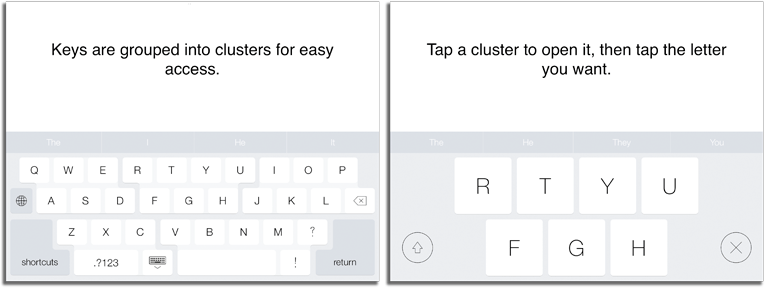
SuperKeys provides big keys, while maintaining a standard qwerty layout that does not require scanning or switches. By grouping the keys into clusters of six or seven keys, SuperKeys provides fast keyboard access with no more than seven large keys to choose from.
SuperKeys is now included as an option within Clicker Connect and Clicker Docs. Children with access difficulties can now access both the keyboard and Clicker Grids by first selecting a cluster, and then selecting the key or cell they want.
You’ll find the SuperKeys option in the Clicker Connect and Clicker Docs Accessibility menu – if it’s not there, download the latest update from the App Store.
SuperKeys for all apps
SuperKeys is now available as a standalone keyboard that works with any iPad app. It also works on the iPhone, offering access for the many people who find the keys on a phone keyboard too small. It also provides one-touch access to commonly used words and phrases – great for sending text messages!